

Artificial intelligence (AI) is now part of everyday financial analysis. What once required hours of manual work — spotting risks, detecting fraud, and more — is now done in minutes with machine learning and smart tools.
AI Financial Analysis: Key Points
FinanceGPT simplifies complex reports into visual insights — over 3,000 companies now use it to speed up portfolio analysis.
AnyLogic, Quantivate, and Zest AI support smarter planning, compliance, and credit scoring — each with hands-on control.
Oracle Fusion helps large teams enforce structure across budgets and approvals, but setup must be tightly managed to scale smoothly.
AI’s Growing Role in Financial Analysis
About 70% of financial executives believe AI will drive revenue growth in the next few years, prompting 58% of companies to adopt it in their finance functions.
What tools are helping them get there? I’ve tried and compared leading AI tools for financial analysis, and these five gave the most practical, real-world value.
| Feature | Finance GPT | Oracle Fusion | AnyLogic | Quantivate | Zest AI |
| Best For | Comprehensive financial analysis | Enterprise-grade finance automation | Strategic scenario modeling | Risk management & compliance | Lending and credit risk analysis |
| Risk Analysis | ✅ | ✅ | ✅ | ✅ | ✅ |
| Forecasting | ✅ | ✅ | ✅ | ❌ | ✅ |
| Automation | ✅ | ✅ | ✅ | ✅ | ✅ |
| Visualizations | ✅ | ✅ | ✅ | ✅ | ✅ |
| Scenario Modeling | ✅ | ✅ | ✅ | ❌ | ❌ |
| Pricing | $299.99/mo | Custom pricing | Free (Learning Edition) | Custom pricing | Custom pricing |
Saddam Husen, CTO of Comfygen, emphasized that AI is transforming the way CFOs approach strategic planning. According to him, “AI shifts forecasting from reactive to predictive,” allowing finance leaders to go beyond static historical data. He explained that today’s AI-driven models are dynamic, constantly adjusting projections based on real-time inputs.
“These tools can simulate various economic scenarios, optimize resource allocation, and even suggest budget changes before problems arise,” Husen noted. This shift, he added, enables CFOs to make quicker, more informed decisions while significantly reducing financial uncertainty.
1. Finance GPT: Best for Comprehensive Financial Analysis
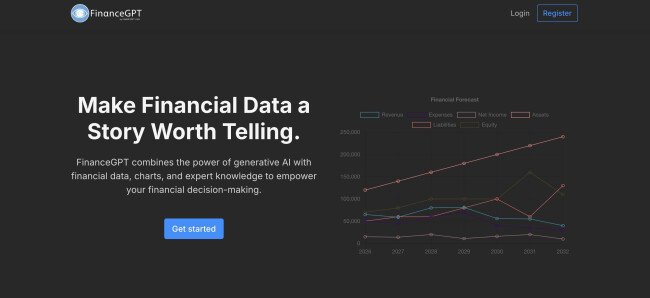
FinanceGPT is an AI-powered tool that helps simplify financial analysis. It’s built to support teams with tasks like forecasting, portfolio optimization, and financial planning without needing advanced technical skills.
You can turn raw financial data into clean visualizations, explore various scenario models, and extract insights that help reduce risk or optimize returns. While you’ll need to upload your files manually, it handles a wide range of formats and delivers fast, structured results.
Over 3,000 companies already use FinanceGPT to streamline reporting and decision-making.
| Pros | Cons | Pricing |
|
|
|
Does it do what the tool says it will do?
I’m not a financial analyst, but I handle enough numbers to know when a tool actually helps — and FinanceGPT genuinely does. What I liked right away was how it breaks down long reports and statements into something scannable. It’s a lot easier to compare data over time without squinting at spreadsheets.
What I liked even more was how it visualizes the results.
I uploaded a few test files and got charts that not only made sense, but even surfaced patterns I wouldn’t have spotted myself. It handled things like monthly returns and standard ratios (Sharpe, max drawdown, etc.) with ease, and even flagged a few odd trends I hadn’t considered.
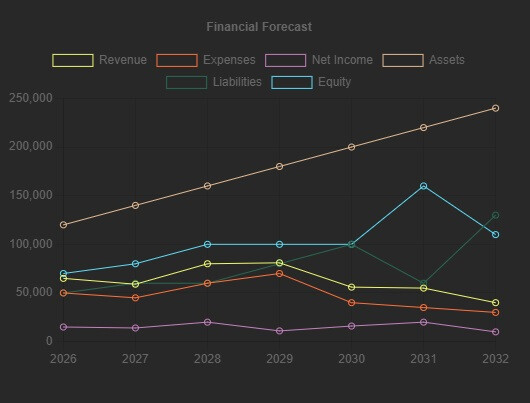
You still have to upload your own docs (there’s no plug-and-play with your accounting software), but once it’s in, it works fast. The way it handled risk insights and diversified portfolio suggestions felt pretty advanced for something I didn’t need to code or configure.
Get started with Finance GPT today.
What Users Say
Users generally appreciate what FinanceGPT brings to the table — especially those who know their way around financial concepts but want a faster, more visual way to work through them. It’s frequently praised for handling key metrics like Sharpe ratios, max drawdowns, and scenario-based modeling with ease. Some even say it makes analysis feel addictive.
But it’s not without friction.
A few noted that you still need to upload your data manually, which slows things down if you’re working with large datasets.
Others flagged issues with formatting — like misaligned numbers or buggy exports — particularly in dense reports. And while it offers smart insights, you’ll still need to know what those insights mean to act on them.
Who’s It For?
So, while not entirely plug-and-play, Finance GPT is a strong pick if you want depth and flexibility and can tolerate the occasional hiccup.
It’s a great fit for business owners, finance leads, or anyone who works with financial data often but doesn’t want to wrestle with heavyweight platforms. It delivers serious analysis without getting in your way.
Other Notable Features
- Autonomous treasury management
- Working capital optimization
- Real-time fraud prevention

Explore The Top Accounting Services
Agency description goes here
Agency description goes here
Agency description goes here
-content.jpg "Oracle")
Oracle Fusion Cloud Financials is a cloud-based finance system built for large businesses. It helps teams manage core tasks like budgeting, forecasting, reporting, and tracking expenses in one place.
It’s part of the bigger Oracle Fusion suite, which connects finance with other departments like HR and supply chain. That means fewer data silos and better visibility across the business.
| Pros | Cons | Pricing |
|
|
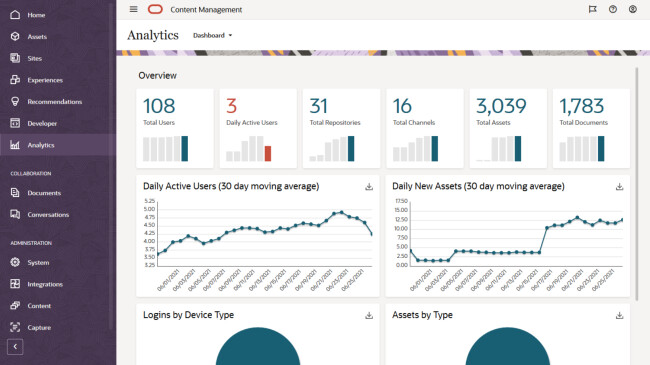
One of its strengths is automation. You can set it to handle routine processes like invoice approvals or expense tracking, and it comes with real-time dashboards that help you catch issues before they become problems.
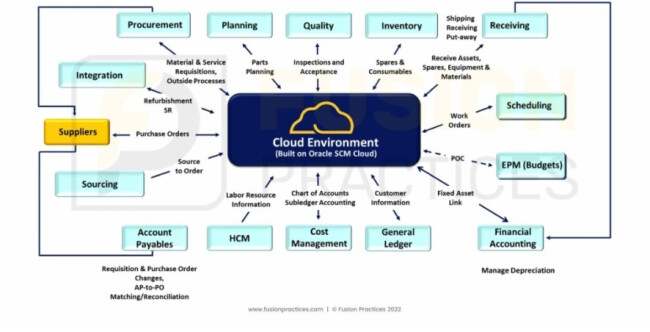
My experience with Oracle Fusion was mixed, but I can see why larger teams stick with it. Once I got past the dense interface, a few things did stand out.
What I appreciated most was how customizable it felt, especially on the automation front. After some setup, the system started handling routine tasks like approvals and ledger entries with minimal input. It’s not exactly intuitive, but once those workflows are in place, it really does save time.
Compared to older tools like SAP (which I’ve worked with), I found Fusion’s setup to be a bit leaner and less bloated — though that might depend on how heavily your team has customized it.
What Users Say
Oracle Fusion gets mixed reviews from users. Some users praise its automation capabilities, especially finance teams with complex workflows.
One consultant mentioned that once automation is configured properly, it can significantly reduce manual input across accounting and approval tasks. Others who transitioned from systems like SAP noted that Fusion can feel less bloated — depending on how it’s implemented.
A few Redditors highlighted that newer versions of Oracle Cloud Infrastructure (OCI) also offer strong performance and better pricing compared to AWS.
But of course, it’s not without pain points.
Some users have flagged the user experience as unintuitive and click-heavy, especially during setup and workflow configuration. Others raised concerns about vendor lock-in — particularly around account deletion and data removal, which reportedly isn’t as transparent as other platforms.
Who’s It For?
Oracle Fusion may not be the most intuitive or budget-friendly tool out there. But for enterprises that need depth, scale, and robust forecasting capabilities, it delivers.
Its automation features and detailed financial workflows make it a strong fit for large finance teams juggling multiple approval layers, compliance rules, and reporting deadlines.
If you’ve got the resources to implement it properly, Fusion can help bring serious structure and predictability to your forecasting. Just be prepared for a steeper learning curve.
Other Notable Features
- Predictive cash forecasting
- Scenario modeling
- Unified financial planning and execution
Contact Oracle to get started.
3. AnyLogic: Best for Strategic Scenario Modeling
-content.jpg "AnyLogic")
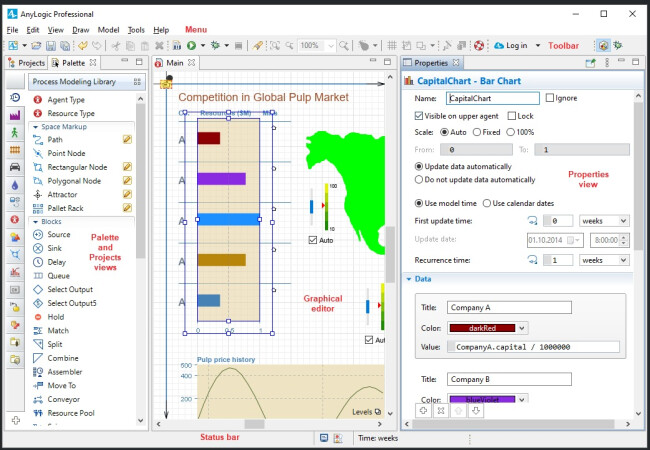
AnyLogic lets you map out different financial scenarios and see how decisions could play out before they happen. That includes big-picture moves — like shifting pricing models or adjusting investment strategies — and more operational choices, such as cost allocations or resource planning.
| Pros | Cons | Pricing |
|
|
|
Unlike most planning tools, it combines multiple simulation methods in one model. That makes it especially strong for layered, real-world problems where factors are constantly changing.
It’s used by finance teams and analysts who need to build long-range plans and test strategies with fewer assumptions.
What Users Say
Users say AnyLogic stands out for how well it handles complex simulations, especially when combining methods like agent-based, discrete events, or system dynamics. One reviewer even called it “invaluable for tackling complex system problems,” adding that the payoff in insights is worth the steep learning curve. On the other hand, others find it user-friendly and easy to work with.
Still, other users say — and I agree — that there’s a learning curve.
Some users mentioned that building complex models in AnyLogic isn’t exactly beginner-friendly, especially if you’re not comfortable working with Java. Others pointed out that community support can be limited, which makes troubleshooting tougher when you’re just starting out.
Who’s It For?
Yes, it has a learning curve, especially if you’re not familiar with Java. But for teams willing to invest in it, AnyLogic offers depth and precision most tools can’t match.
It stands out in strategic scenario modeling because of how flexible and visual it is. It lets you build models that reflect the real dynamics of your business and simulate how different decisions might play out.
If you’re making long-term plans or managing operations with a lot of moving parts, this tool gives you clarity. It’s especially useful for finance leads, strategists, and analysts who want to test “what-if” scenarios without coding from scratch.
Try the free version of AnyLogic.
Other Notable Features
- Multimethod modeling
- Cloud simulation
- Interactive visualizations
- GIS modeling
- Java customization
We’ll find qualified accounting firms for your company, for free.
GET STARTED
4. Quantivate: Best for Risk Management and Analysis
-content.jpg "Quantivate")
Quantivate gives you a smarter way to manage risk and compliance across your organization. It connects processes like audits, vendor oversight, and regulatory tracking so your team can see how risks impact each other — and act faster.
For finance teams, that means fewer surprises and better decisions when it matters most.
| Pros | Cons | Pricing |
|
|
I wasn’t sure what to expect going into Quantivate, but once I started using it, I noticed its flexibility. I liked how the platform didn’t force me into a rigid workflow. The templates were fully customizable, which helped tailor the risk and compliance processes to our specific business needs.
More than that, everything I needed — policies, risk registers, compliance workflows — was integrated in one place, and it all worked together in a way that made oversight easier and reporting faster.
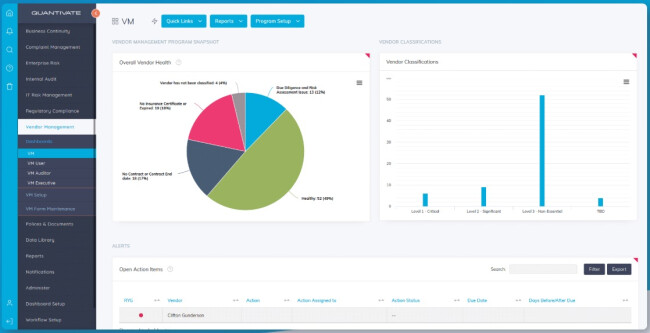
Navigation also felt pretty intuitive. I didn’t have to dig too deep to find what I needed, and that’s a big win when you’re juggling compliance across multiple teams or departments.
What Users Say
Like me, a lot of people recognize its flexibility and customization capabilities. Users appreciate the platform’s templated structure and modular design, which allow for tailoring risk and compliance processes to specific business needs.
The platform’s ease of use is praised, with users noting a lack of issues during implementation and daily operations. Users note that Quantivate helped streamline multiple processes, even within a complex organizational structure.
Like any other tool, there are a few drawbacks.
While the interface is user-friendly, some users reported occasional glitches, especially with report generation and printing features. Others mentioned that the lack of an on-premise deployment options could be a dealbreaker for organizations with strict data control requirements.
Who’s It For?
Quantivate is a strong fit for mid-sized to large organizations that need flexible risk and compliance tools without building them from scratch. It’s especially helpful for teams managing multiple risk areas and wanting everything centralized.
While it has a few limitations around reporting and on-prem deployment, its strength lies in how adaptable and modular it is. If your workflows are layered or specific to your industry, Quantivate gives you room to tailor without a full-blown custom build.
Other Notable Features
- Workflow automation
- Real-time dashboards
- Customizable risk scoring
- Centralized document repository
- Audit trail tracking
Request a demo to see Quantivate in action.
5. Zest AI: Best for Lending Analysis
Zest AI helps lenders improve how they assess credit risk. It uses machine learning to analyze thousands of data points — not just credit scores — to give a clearer picture of a borrower’s true risk.
The platform builds and deploys custom underwriting models, giving finance teams more accurate, compliant, and inclusive lending decisions at scale.
| Pros | Cons | Pricing |
|
|
I tested Zest AI to see if it lived up to the buzz around fairer, smarter lending. I’ve tested enough AI tools to spot when one’s got real depth. Zest AI’s dashboard made it easy to build a sample model using mock data. I could prioritize different variables — like income stability or credit history — and see how each one shaped the outcome.
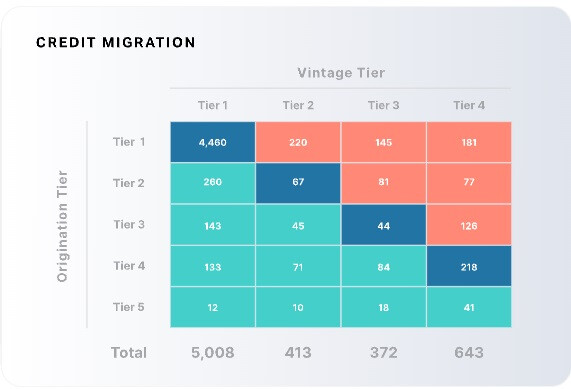
What stood out most was its transparency. It didn’t just give a score; it explained how it got there. I also tested its bias detection, which flagged inconsistencies in how certain profiles were scored. For compliance-heavy environments, that’s a huge win.
Once the model was live, the monitoring tools showed real-time performance — approval rates, risk drift, and where results needed fine-tuning.
What Users Say
Users appreciate Zest AI for giving them deeper visibility into how lending decisions are made. Many highlight the platform’s explainability and bias detection as standout features — especially in compliance-heavy environments.
Others say it improves decision speed without turning everything into a black box. The ability to fine-tune models and trace how inputs affect outcomes gives teams more confidence in the results.
While a few mention a learning curve at the start, most agree the added control and insights make it worthwhile.
Who’s It For?
Zest AI isn’t for casual users. If you’re not working in credit or lending, this probably isn’t your tool.
But if you’re part of a finance team — especially one responsible for credit decisions — it gives you serious control over how those decisions are made. It’s ideal for teams that want more transparency, need to reduce bias, or are navigating tight compliance requirements.
You’ll get the most out of it if you already have some data infrastructure in place and are ready to move beyond traditional scoring models.
Other Notable Features
- ZAML suite
- Bias detection tools
- Explainability framework
- Real-time monitoring
- Regulatory support
Want us to find the best accounting firm for you? It’s free.
GET STARTED
FAQs: AI in Financial Analysis
1. How is AI currently used in financial analysis?
AI is applied to automate processes (e.g., invoice matching, reconciliations), enhance forecasting through machine learning models, detect fraud and anomalies in real-time, and generate reports or financial commentary using natural language processing (NLP).
2. Where should companies start with AI in finance?
Start with a single, high-impact process like month-end close, forecasting, or fraud detection. Prove value quickly, then scale.
3. Is AI adoption realistic for smaller companies or lean teams?
Absolutely. Many AI tools today are cloud-based and modular, making them accessible to mid-sized and smaller finance teams without large IT investments.
link